Showing posts with label hard. Show all posts
Showing posts with label hard. Show all posts
Saturday, November 15, 2014
How To Hard Reset Nokia Lumia 520
1.Turn off your lumia 520 phone.
2.press and hold the volume down and camera keys..
3.press and hold the power key
4.when you feel the phone vibretes .release the power key.but keep pressing the volume down and camera keys.until the phone reboots.
all data will be lost ! it will 100% work

2.press and hold the volume down and camera keys..
3.press and hold the power key
4.when you feel the phone vibretes .release the power key.but keep pressing the volume down and camera keys.until the phone reboots.
all data will be lost ! it will 100% work

Tuesday, November 11, 2014
Intex ibuddy connect II Hard Reset
Intex ibuddy connect II Hard Reset
Hard Reset:
Power On Device and connect to pc or laptop
Download Android Multi tool and Drivers from Here
Install both drivers "SCI android drivers" and "ADB Android Drivers"
Now open tool and press "5" and hit Enter Key to wipe data / factory reset.
after format handset restart automatic
hard reset done
Read More..
Hard Reset:
Power On Device and connect to pc or laptop
Download Android Multi tool and Drivers from Here
Install both drivers "SCI android drivers" and "ADB Android Drivers"
Now open tool and press "5" and hit Enter Key to wipe data / factory reset.
after format handset restart automatic
hard reset done
Saturday, November 8, 2014
Zen Ultrafone 303 Hard Reset Method
Switch Off Your Phone
Take Out Sim And Memory Card
Press And Hold Volume Up Key + Power Key
When You See Android Logo Release All Key
Touch Home Key to See Recovery Menu
Scroll Selection To ‘ Factory reset /wipe data ‘ Using Volume Key
Confirm Action Using Home Key
Then Select Yes — delete all user data And Confirm
Wait Some Seconds. Then Select Reboot System Now Option And Confirm
Now Your Phone Will Restarted. After Completing The Hard Reset Process.
Read More..
Take Out Sim And Memory Card
Press And Hold Volume Up Key + Power Key
When You See Android Logo Release All Key
Touch Home Key to See Recovery Menu
Scroll Selection To ‘ Factory reset /wipe data ‘ Using Volume Key
Confirm Action Using Home Key
Then Select Yes — delete all user data And Confirm
Wait Some Seconds. Then Select Reboot System Now Option And Confirm
Now Your Phone Will Restarted. After Completing The Hard Reset Process.
Wednesday, November 5, 2014
Hard Reset Samsung Focus 2 I667
Hard Reset Samsung Focus 2 I667
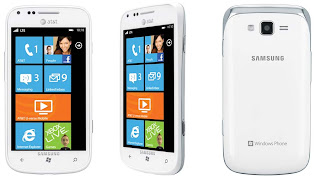
2. Power up the device by pressing the Camera key + Volume down key and Power key .
When the device vibrates, release the Power key, but continue pressing the Camera and Volume down keys.
Once the device displays the Are you sure you want to format? screen, release the Camera and Volume down keys.
Note: If the download mode screen displays, go back to Step 1 and try again.
3. Press the Window key to Format the device. "Are you sure you want to format?" will appeare The message Formatting will erase all your personal content and restore the factory settings. Do you want to continue? displays.
4. Press the Window key again to confirm that you want to format the device.
Warning! Important! Do not remove the battery while formatting your phone.
Wait until the device switches on and displays the Home screen.
After formatting is complete, the Start-up Wizard screen displays.
or
Go to dial pad and type *2767*3855#
Sunday, November 2, 2014
How to Master Reset or Hard Reset a Sony Ps3
reset to factory settings

Hard Reset procedure for the PS3 Be sure to backup your settings/games saves by doing a System > Backup on your PS3 or you may lose your game saves! Also, this is a last resort procedure prior to exchanging/returning to sony.
1. Power Off the PS3 via the power switch in back and power back on w/switch.
2. Hold Power Button on the Front until you hear 3 beeps.
3. Then go through the initial setup and then run a full Format via System > Format. (will take approx 3 1/1 hours). You may need to have our AV cables ready if your using HDMI (in case HDMI isnt detected after initial reset).
4. Restore your backup you made prior to doing factory/hard reset (optional, if you created a backup).
Hopefully this will solve your freezing problems.Problems/symptons that this appears to have resolved:
-freezing when doing anything
-no harddrive activity
-freezing when trying to use onboard keyboard or bringing up keyboard
-game/movie disc freezes system
Alcatel OT 5020 MPOP hard reset
Alcatel OT-5020 MPOP hard reset
Before you buy a new cell phone or new tablet, please try the following procedure to repair your device. First charge your battery, backup your important data if possible and in most cases take out SIM and SD card. It is impossible to recover your data after doing a hard reset, so online backup is always important. For all of your data, a backup should be done on an external device, hard drive, raid system or media.
Alcatel OT-5020 MPOP Android hard reset
When you are unable to power on your phone, there is a way to perform a factory data reset by using hardware keys. Press the Volume up key and the power key at same time until the screen lights up. All data will be lost!
Alcatel MPOP 5020 hard reset
Factory data reset
Erase all of your personal data from internal phone storage, including information about your Google Account, any other accounts, your system and application settings, and any downloaded applications. Resetting the phone does not erase any system software updates you’ve downloaded or any files on your microSD card, such as music or photos. If you reset the phone in this way, you’re prompted to re-enter the same kind of information as when you first started Android.
Go to Settings >Privacy > Factory Data reset > Reset phone > Erase everything.
Read More..
Before you buy a new cell phone or new tablet, please try the following procedure to repair your device. First charge your battery, backup your important data if possible and in most cases take out SIM and SD card. It is impossible to recover your data after doing a hard reset, so online backup is always important. For all of your data, a backup should be done on an external device, hard drive, raid system or media.
Alcatel OT-5020 MPOP Android hard reset
When you are unable to power on your phone, there is a way to perform a factory data reset by using hardware keys. Press the Volume up key and the power key at same time until the screen lights up. All data will be lost!
Alcatel MPOP 5020 hard reset
Factory data reset
Erase all of your personal data from internal phone storage, including information about your Google Account, any other accounts, your system and application settings, and any downloaded applications. Resetting the phone does not erase any system software updates you’ve downloaded or any files on your microSD card, such as music or photos. If you reset the phone in this way, you’re prompted to re-enter the same kind of information as when you first started Android.
Go to Settings >Privacy > Factory Data reset > Reset phone > Erase everything.
Friday, October 31, 2014
Hard Reset Karbonn Smart Tab 1
Follow these steps to hard reset karbonn Smart Tab1 with a simple method. All data will be deleted from The Tab memory. But no effect happen simcard contacts an mmc card. ofter hard reset your phone looks like New as from company. Here is steps to Hard reset ,factory reset Karbonn Smart Tab1.

Hard Reset Karbonn Smart Tab1
1. Switch off your Tab.
2. Press Volume key Down & POWER key, Hold These Two keys 3 seconds.
3. Ofter 3 seconds Release Power Key and keep holding the Volume down key until you see Recovery menu.
4. Now choose option wipe data.
5. For moving up and down use volume keys to select wipe data.
6. Then Press Button as ok to confirm...
7. Reboot Tab1.
I hope this post ..How To Hard Reset Karbonn Smart Tab1.. Helps you To solve your karbon smart Tab1 problem..
2. Press Volume key Down & POWER key, Hold These Two keys 3 seconds.
3. Ofter 3 seconds Release Power Key and keep holding the Volume down key until you see Recovery menu.
5. For moving up and down use volume keys to select wipe data.
6. Then Press Button as ok to confirm...
7. Reboot Tab1.
I hope this post ..How To Hard Reset Karbonn Smart Tab1.. Helps you To solve your karbon smart Tab1 problem..
Watch this Tutorial:
Wednesday, October 29, 2014
How to Hard Reset HTC Droid Eris
HTC Droid Eris Hard Reset
Perform a hard reset on your HTC Droid Eris. These steps will clear all data and settings off the device.1. With the phone turned off, press and hold the Volume Down and Send buttons.
2. Press the Power button.
3. Follow the instructions to complete the hard reset.
Sunday, October 5, 2014
How to Factory Reset Hard Reset iPhone 5S
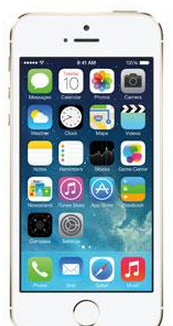 iPhone 5S is the latest iPhone model from Apple. Restoring the default settings or factory reset your iPhone 5S will delete all your saved files. It is recommended to backup your important files on your computer before attempting to reset your device.
Why do we need to reset the device? We have our own reasons why we factory reset our device. Maybe we want to delete all the files and restore the device to its original state. It could also be the device may be malfunctioning or so slow and it needs to be reset.
Step 1. On your iPhone, go to "Settings".
Step 2. Select "General" option.
Step 3. On the bottom of the Lcd, tap "Reset".
Step 4. You will be seeing a list of things which you can reset. If you want to reset all the content, select "Erase All Content and Settings".
Step 5. Tap "Yes" to confirm the action.
Now, you just need to wait while your iPhone 5S is wiping all datas or files on your device. In a short while your device will be good as new.
In case your iPhone 5S is unresponsive or frozen, you may need to hard reset your device. Press and hold the "Power Button" and the "Home Key Button" at the same time for at least ten seconds until the Apple logo appears.
Thursday, September 25, 2014
Htc One X hard reset

Htc One X data:
GSM frequencies :850 900 1800 1900
Standard UMTS :850 900 1900 2100
Type :Touch
Dimensions (W x H x D) :134,36 x 69,90 x 8,90 mm
Weight :130,00 g
Main display :Color / Super LCD
16M colors
720 x 1280 px (4.70") 312 ppi
Standard battery :Li-Ion 1800 mAh
Internal memory :32 GB
RAM memory :1 GB
Operating system :Android 4.0 Ice Cream Sandwich
Processor :Nvidia Tegra 3 T30
Processor clock :1,50 GHz
How to hard reset:
If you forgot your Lcd lock combination or password follow these steps.
Warning! All data will be lost!
1.Press together volume down + power button
2.Keep press untill recovery menu appears
3.Choose with volume buutons "factory reset" and select it with power button
4.Wait until phone restarts
Wednesday, August 13, 2014
How To Hard Reset Samsung Galaxy S3
How To Hard Reset Samsung Galaxy S3 - The million dollar question is why one would wish to Hard reset Samsung Galaxy S3—the quickest device on the world to date? doubtless, Samsung’s new providing aka Samsung Galaxy S3 is one among the foremost powerful devices out there, however its susceptible to errors. Nothing is written within the epitaph. Like somebody aforesaid that nothing is ideal during this world, identical applies to Samsung merchandise likewise. Neither Samsung nor Apple, or any merchandise for that matter, is near excellent. whereas Samsung is understood as a master of saying among fans, there square measure sure issues absolute to occur over the amount of your time. for instance, pile of play store information and different information rotten into cache may ultimately weigh down your device.

Samsung Galaxy S III hard reset
force reset Reset the device (press and hold POWER button for 8-10 seconds)
Unlock Galaxy S3 T999 i747 i535 using hard reset
sgs3 hard reset or reset Galaxy S3: PRESS AND HOLD VOLUME UP + Home Button + Power
- Turn the phone off.
- Press and hold VOLUME UP and Home(center) button
- Press Power until the phone vibrate
- Wait until you see the Android logo then release all the buttons.
- Select Wipe data/Factory reset with VOLUME DOWN, press Power (right hand-side)
- Select YES -- delete all user data with VOLUME DOWN and then press Power
- After format, press Power again to reboot phone. (select reboot system now)
If your device is frozen and unresponsive, press and hold for 8-10 seconds. The device will reboot automatically. If this does not solve the problem, perform a factory data reset. In Idle mode, open the application list and select Settings → Back up and reset→ Factory data reset → Reset device→ Delete all.
or Factory format entering sgs3 format code
Use this method to hard reset your Samsung Galaxy S III: Enter *2767*3855#. Warning! All your data including contacts, messages etc. will be lost! Copy all your necessary data/Contacts/Messages etc. to SIM or make backup to your PC before full reset! Take out SIM card before full reset.
Note: If you reset your device to the factory defaults with SD card encryption setting enabled, the device will not be able to read your encrypted files. Disable this setting before resetting the device.
sgs3 firmware flash download mode: PRESS AND HOLD VOLUME down + Home Button + Power on
Subscribe to:
Posts (Atom)