Wednesday, November 12, 2014
Nokia C2 03 Lcd Display Problem Solution Ways Jumpers
Nokia C2-03 Blank Lcd Display, Nokia C2-03 White Lcd Display, Nokia C2-03 Lcd Jack Damage Prints Missing.Nokia 5230 Not Charging solution no response problem solution
To solve lcd display problem in Nokia C2-03 we have required a few tools and components.
Nokia screw Driver t5 and t4 for opening screw .
Lcd panel for Nokia C2-03
Electronics Cleaner for rust or water damage.
Hot air to dry the mother board.
Lcd Jack if we have to replace it.

Diagnosting & Solution:
After disassemble of Nokia C2-03 remove lcd and check lcd jack and its near by area for rust or water damages.
If here is some carbon on parts or at lcd jack.
Apply electronics cleaner and dry it with hot air for a few mint.
Do not apply so much heat it can harm your skin and mother board parts also.
Check with Lcd and if it is still blank replace with new one.
It might be possible that lcd jack pins are missing or not getting connected with lcd so change it.
Check all these links as given in above diagram in different colors so that you can find them easily.
Warnings:
Do not apply to much heat it can damage the mother board.
Make sure mother board is dry proper when you apply electronics clean.
Check Lcd jack and when removing it make sure solder has been melt.
If solder has not proper melt and you try to remove lcd jack prints might be damage.
When you replace lcd make sure lcd strip is proper fixed.
It can be damage when you assemble the phone if not in proper place.
for more detail and new tips and tricks about cellphone service problem keep visiting this page we will update daily this blog timely with other mobile solution.
Read More..
To solve lcd display problem in Nokia C2-03 we have required a few tools and components.
Nokia screw Driver t5 and t4 for opening screw .
Lcd panel for Nokia C2-03
Electronics Cleaner for rust or water damage.
Hot air to dry the mother board.
Lcd Jack if we have to replace it.
Diagnosting & Solution:
After disassemble of Nokia C2-03 remove lcd and check lcd jack and its near by area for rust or water damages.
If here is some carbon on parts or at lcd jack.
Apply electronics cleaner and dry it with hot air for a few mint.
Do not apply so much heat it can harm your skin and mother board parts also.
Check with Lcd and if it is still blank replace with new one.
It might be possible that lcd jack pins are missing or not getting connected with lcd so change it.
Check all these links as given in above diagram in different colors so that you can find them easily.
Warnings:
Do not apply to much heat it can damage the mother board.
Make sure mother board is dry proper when you apply electronics clean.
Check Lcd jack and when removing it make sure solder has been melt.
If solder has not proper melt and you try to remove lcd jack prints might be damage.
When you replace lcd make sure lcd strip is proper fixed.
It can be damage when you assemble the phone if not in proper place.
for more detail and new tips and tricks about cellphone service problem keep visiting this page we will update daily this blog timely with other mobile solution.

Tuesday, November 11, 2014
Intex ibuddy connect II Hard Reset
Intex ibuddy connect II Hard Reset
Hard Reset:
Power On Device and connect to pc or laptop
Download Android Multi tool and Drivers from Here
Install both drivers "SCI android drivers" and "ADB Android Drivers"
Now open tool and press "5" and hit Enter Key to wipe data / factory reset.
after format handset restart automatic
hard reset done
Read More..
Hard Reset:
Power On Device and connect to pc or laptop
Download Android Multi tool and Drivers from Here
Install both drivers "SCI android drivers" and "ADB Android Drivers"
Now open tool and press "5" and hit Enter Key to wipe data / factory reset.
after format handset restart automatic
hard reset done
Nokia C2 03 Mic Problem Solution Jumper Ways Microphon
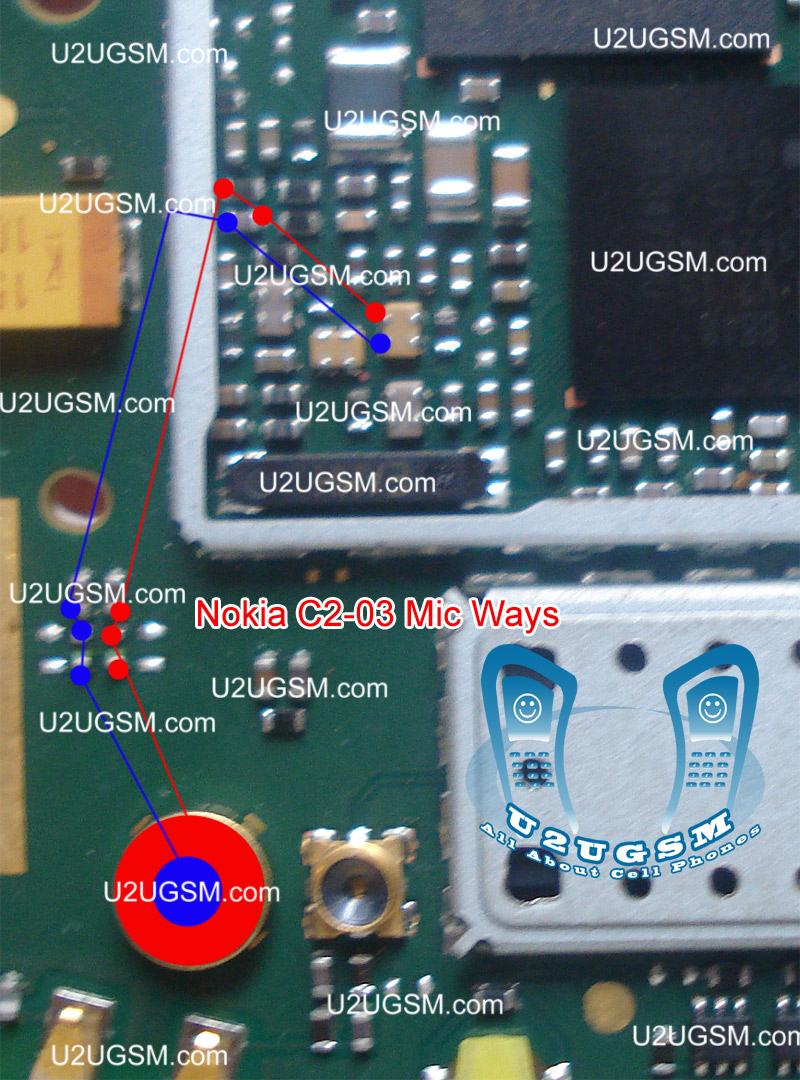 Nokia C2-03 Mic not working, Microphone is not working in Nokia C2-03, Voice is missing and can not reach to destination Mobile Phone, Mic problem, Microphone Solution in Nokia C2-03 Nokia 5230 power switch button ways solution power key not working
 Tools:-
Nokia T5 and T4 for disassemble.
Universal Microphone.
Electronics Cleaner.
Hot Air.
Electronics Meter.
Solding iron.
Diagnostics & Solutions:-
Before Disassemble of Nokia C2-03 make sure that mic whole in Cassing ( housing ) is opened. And here is not any dust in it. Disassemble the mobile phone and remove mic microphone from mother board with solding iron.
Check points on mother board with miter and if any value is missing check all these parts that are given in red and blue color in above diagram.If any of them is missing apply jumpers as described in above repairing picture.
Replace new mic and apply jumpers to its negative and positive points. On the mother board Red color line shows ground print and Blue line indicates positive print of mic. So this will help you to solve mic problem in nokia C2-03
Warnings:-
Apply solder on mic and Remove mic when it too hot so that mic print remain OK.
Don’t apply much heat with hot air it can damage the mother board.
Assemble with focus because if mic is not in its proper place voice will not reach to destination mobile. Or you will not be able to record voice in it.
for more detail and new tips and tricks about cellphone service problem keep visiting this page we will update daily this blog timely with other mobile solution.
Sunday, November 9, 2014

Nokia 5130 express Memory Card Not Detected Solution

Nokia 5130 express Memory Card Not Detected Solution
NOKIA N73 BLANK SCREEN

NOKIA N73 BLANK SCREEN: THE PICTURE CONTAINS NOKIA N73 BLANK SCREEN REPAIRING SOLUTION.

Subscribe to:
Posts (Atom)