Tuesday, November 4, 2014
Nokia Asha 311 usb not detected problem can be solved
this image is useful to solve the usb detecting problem in nokia Asha 311 so check these parts that are indicated in red lines in image.clean this area and leave it to dry for a few mints.resold these parts and if problem is not solve then you may have to replace these parts also.

these parts are used in usb charging and data mas storage functioning.so if your Nokia Asha 311 show errors in charging with usb or mass storage you can re hot or resold these parts that are shown in the diagram encircled in red lines.you may have to change these components if Nokia Asha 311 usb charging prob not solved with only resold ding these components.
for more detail and new tips and tricks about this problem keep visiting this page we will update it timely with new diagrams.some related post are also given bellow you can read them also for more information.
these parts are used in usb charging and data mas storage functioning.so if your Nokia Asha 311 show errors in charging with usb or mass storage you can re hot or resold these parts that are shown in the diagram encircled in red lines.you may have to change these components if Nokia Asha 311 usb charging prob not solved with only resold ding these components.
for more detail and new tips and tricks about this problem keep visiting this page we will update it timely with new diagrams.some related post are also given bellow you can read them also for more information.

Monday, November 3, 2014
Nokia X3 Charger not supported solution
This solution may possibly help fix Nokia X3 Charger not supported problem. This kind of problem indicates and show on the LCD display "charger not supported" when the battery charger is being plug-in.
The possible caused by this is a damaged certain components on the nokia X3 circuitry that holds for battery indication and charging operation.
The solution below will show which or where this particular components located or mounted on the nokia X3 PCB board circuit.

The Btemp resistor which has value of 47K is mounted or located near SIM card interface, if these resistor breakdown it will result to nokia X3 charger not supported problem.
The possible caused by this is a damaged certain components on the nokia X3 circuitry that holds for battery indication and charging operation.
The solution below will show which or where this particular components located or mounted on the nokia X3 PCB board circuit.
Nokia X3 Charger Not Supported Solution

The Btemp resistor which has value of 47K is mounted or located near SIM card interface, if these resistor breakdown it will result to nokia X3 charger not supported problem.
Nokia E52 Shortage No Power Problem Solution
Nokia E52 get water damage and it is not getting power on due to shortage.To solve this problem look at diagram bellow and find the capacitor that is given in it.

Clean the mother board where ever you find carbon or rust in it.Dry it with hot air and do not apply too much heat because it can harm your skin and may can damage the Nokia E52 Mother board.
If it can not be OK with cleaning the board for shortage in Nokia E52 you may can remove this capacitor and it will be fine.
The Nokia E52 Shortage problem would be solve and it will power on easily without shortage.
for more detail and new tips and tricks about cellphone service problem keep visiting this page we will update cellphone service diagrams timely with new cellphone diagrams.some related post are also given bellow you can read them also for more information about cellphone.
Read More..
Clean the mother board where ever you find carbon or rust in it.Dry it with hot air and do not apply too much heat because it can harm your skin and may can damage the Nokia E52 Mother board.
If it can not be OK with cleaning the board for shortage in Nokia E52 you may can remove this capacitor and it will be fine.
The Nokia E52 Shortage problem would be solve and it will power on easily without shortage.
for more detail and new tips and tricks about cellphone service problem keep visiting this page we will update cellphone service diagrams timely with new cellphone diagrams.some related post are also given bellow you can read them also for more information about cellphone.
Sunday, November 2, 2014
How to fix your Android phone
The demand for Android phone has always been high, but there could be technical hitches. Need to make an urgent business call or an emergency call and suddenly your mobile does not respond, that’s the last you want to face. Before you begin with the fixing phone, do not forget to take a backup of the files. This is an important thing to remember since there is always a chance to lose the phone’s memory and lose valuable data. To fix the issues with your android mobile there are various methods and it includes -
One of the most commonly followed way of fixing the technical hitch primarily starts with removing the battery of the phone and putting it back again. This is one of the simplest solutions followed by most mobile users or service centers. One of the reasons why this method is followed is by taking the battery out; the user is forcing the device to reset by itself. And by fixing the battery once again you are loading the device.
If the technical hitch doesn’t stop there, it could probably be a software issue. Software updates can be a major reason to fix a technical issue. One of the important factors to remember while going in for a software update would be charging your phone completely and ensuring an internet connection. Because the updating process could be time consuming and it may drain the battery.
The phone updates will be available in the phone settings and upon reset updates will take place. In case if the user is unable to reset the updates, he can connect the device to a computer and follow instruction and do the required software updates. In spite of a software update if the phone still does not work, the user may try out resetting the factory settings. By setting the phone in the factory mode, you will gain back the basic setting of your device.
Before trying the factory setting, the user needs to ensure that the data backup is taken. By setting the factory resetting, the phone memory is erased and all stored data will be lost. The device will be rebooting after the resetting process. The process brings back the original setting of the device or rather the factory state. These are the immediate steps to recover your smartphone and the process that can be followed in case the user faces a technical glitch.
How to Master Reset or Hard Reset a Sony Ps3
reset to factory settings

Hard Reset procedure for the PS3 Be sure to backup your settings/games saves by doing a System > Backup on your PS3 or you may lose your game saves! Also, this is a last resort procedure prior to exchanging/returning to sony.
1. Power Off the PS3 via the power switch in back and power back on w/switch.
2. Hold Power Button on the Front until you hear 3 beeps.
3. Then go through the initial setup and then run a full Format via System > Format. (will take approx 3 1/1 hours). You may need to have our AV cables ready if your using HDMI (in case HDMI isnt detected after initial reset).
4. Restore your backup you made prior to doing factory/hard reset (optional, if you created a backup).
Hopefully this will solve your freezing problems.Problems/symptons that this appears to have resolved:
-freezing when doing anything
-no harddrive activity
-freezing when trying to use onboard keyboard or bringing up keyboard
-game/movie disc freezes system
Alcatel OT 5020 MPOP hard reset
Alcatel OT-5020 MPOP hard reset
Before you buy a new cell phone or new tablet, please try the following procedure to repair your device. First charge your battery, backup your important data if possible and in most cases take out SIM and SD card. It is impossible to recover your data after doing a hard reset, so online backup is always important. For all of your data, a backup should be done on an external device, hard drive, raid system or media.
Alcatel OT-5020 MPOP Android hard reset
When you are unable to power on your phone, there is a way to perform a factory data reset by using hardware keys. Press the Volume up key and the power key at same time until the screen lights up. All data will be lost!
Alcatel MPOP 5020 hard reset
Factory data reset
Erase all of your personal data from internal phone storage, including information about your Google Account, any other accounts, your system and application settings, and any downloaded applications. Resetting the phone does not erase any system software updates you’ve downloaded or any files on your microSD card, such as music or photos. If you reset the phone in this way, you’re prompted to re-enter the same kind of information as when you first started Android.
Go to Settings >Privacy > Factory Data reset > Reset phone > Erase everything.
Read More..
Before you buy a new cell phone or new tablet, please try the following procedure to repair your device. First charge your battery, backup your important data if possible and in most cases take out SIM and SD card. It is impossible to recover your data after doing a hard reset, so online backup is always important. For all of your data, a backup should be done on an external device, hard drive, raid system or media.
Alcatel OT-5020 MPOP Android hard reset
When you are unable to power on your phone, there is a way to perform a factory data reset by using hardware keys. Press the Volume up key and the power key at same time until the screen lights up. All data will be lost!
Alcatel MPOP 5020 hard reset
Factory data reset
Erase all of your personal data from internal phone storage, including information about your Google Account, any other accounts, your system and application settings, and any downloaded applications. Resetting the phone does not erase any system software updates you’ve downloaded or any files on your microSD card, such as music or photos. If you reset the phone in this way, you’re prompted to re-enter the same kind of information as when you first started Android.
Go to Settings >Privacy > Factory Data reset > Reset phone > Erase everything.
Sony Ericsson K300 K500 K700 Mic Ways Solution for Mic Not Working Problem
 |
| Easy Jumpers for K300/K500/K700 Mic Problem |

 |

 | ||
| Another interesting for K300 Mic Problem |

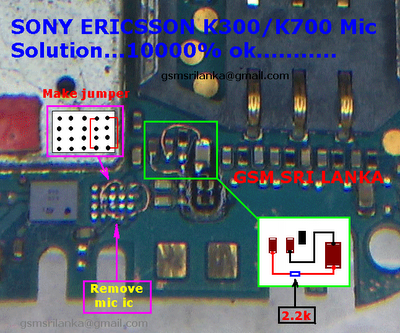 |
| K300 Mic Solution |

Subscribe to:
Posts (Atom)