Showing posts with label i9100. Show all posts
Showing posts with label i9100. Show all posts
Tuesday, September 23, 2014
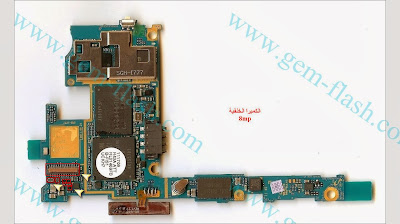
Samsung I9100 GalaxyS2 Camera not working fix problem

Saturday, August 23, 2014
How To Change Samsung SGH I9100 Galaxy SII imei Guide
First Method:

Guide:
1-Select "Speed"
2-Select "I9100" Model
3-Set "Start Address" "Data Length"
Start Address : "0x0000 0040 0000"
Lentgh : "0X0000 0140 0000"
4-Uncheck 3 option...Select "Rom1"
5-Open "I9100_EFS.bin" in "Main" Window
6-Select "Use Adress as Offset xxxxxx"
7-Press "write"
Download I9100_EFS.Bin From Here:
https://hotfile.com/dl/174868639/d5b...0_EFS.rar.html
or Another Work File From Here:
https://hotfile.com/dl/174869883/ad7...EFS_1.rar.html
Second Method : (Write efs From Dump file)
Quote:
* Please Note : Dump Size Does not matter....So,User Can Use Any Size,More Than 128MB...
Its Means,You can use 128MB,256MB,512MB,1GB,----16GB

Guide:
1-Select "Speed"
2-Select "I9100" Model
3-Set "Start Address" "Data Length"
Start Address : "0x0000 0040 0000"
Lentgh : "0X0000 0140 0000"
4-Uncheck 3 option...Select "Rom1"
5-Open "Dump File" in "Main" Window
6-Select "Use Adress as Offset xxxxxx"
7-Press "write"
Guide:
1-Select "Speed"
2-Select "I9100" Model
3-Set "Start Address" "Data Length"
Start Address : "0x0000 0040 0000"
Lentgh : "0X0000 0140 0000"
4-Uncheck 3 option...Select "Rom1"
5-Open "I9100_EFS.bin" in "Main" Window
6-Select "Use Adress as Offset xxxxxx"
7-Press "write"
Download I9100_EFS.Bin From Here:
https://hotfile.com/dl/174868639/d5b...0_EFS.rar.html
or Another Work File From Here:
https://hotfile.com/dl/174869883/ad7...EFS_1.rar.html
Second Method : (Write efs From Dump file)
Quote:
* Please Note : Dump Size Does not matter....So,User Can Use Any Size,More Than 128MB...
Its Means,You can use 128MB,256MB,512MB,1GB,----16GB
Guide:
1-Select "Speed"
2-Select "I9100" Model
3-Set "Start Address" "Data Length"
Start Address : "0x0000 0040 0000"
Lentgh : "0X0000 0140 0000"
4-Uncheck 3 option...Select "Rom1"
5-Open "Dump File" in "Main" Window
6-Select "Use Adress as Offset xxxxxx"
7-Press "write"
Thursday, August 21, 2014
Samsung I9100 GalaxyS2 Dead Short Solution

Subscribe to:
Posts (Atom)